

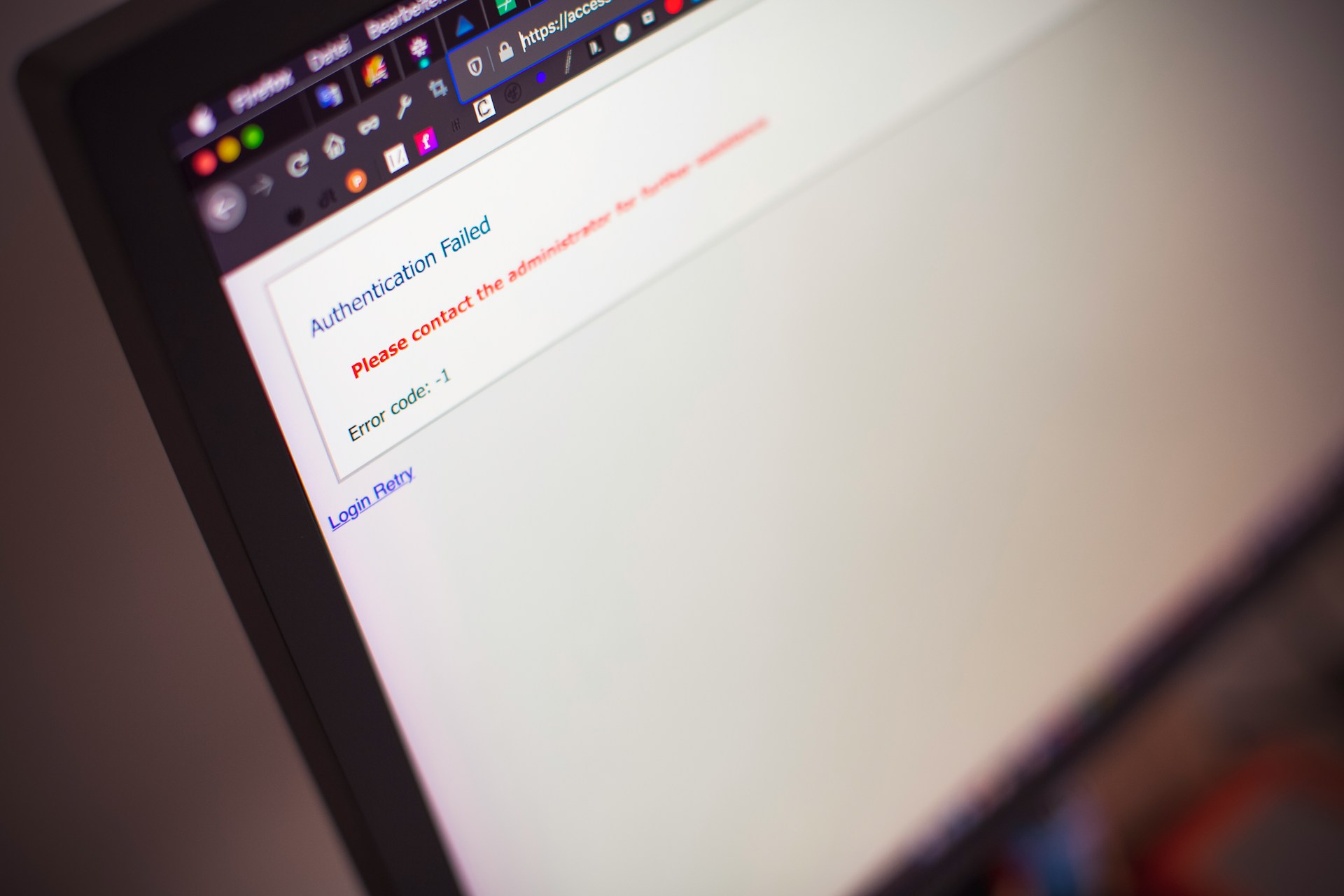


Blog: Website Migration SEO – What Can Go Wrong and How to Prevent It



Key Takeaways
- Website migrations demand SEO foresight, not just design changes:
Switching CMS, merging domains, or restructuring pages can wipe out traffic if redirects, content mapping, and indexing aren't handled carefully. - Redirect strategy and content prioritization are make-or-break elements:
You must audit existing high-performing pages, map them to equivalents in the new structure, and avoid redirecting everything to the home page. Misaligned or blanket redirects lead to lost authority. - AI search visibility is now at risk too:
Migrations that drop schema markup don't just hurt traditional rankings. They can erase your brand's presence in AI Overviews, Perplexity, and ChatGPT answers. - Staging, indexing, and post-launch vigilance are non-negotiable:
Block search engines from your staging site. After launch, remove blocks, monitor for crawl errors, recover missing content, and validate performance against benchmarks.
Table of Contents

Your website is the center of your digital marketing presence, and organic search visibility is one of the hardest things to build, and one of the fastest things to lose.
The stakes of getting a migration wrong are higher than most teams expect. A study of 892 domain migrations found the average recovery time was 523 days — nearly a year and a half — and 17% of sites in that dataset never regained their pre-migration traffic levels, even after 1,000 days.
Poorly executed migrations commonly cause 30% declines in organic traffic and over 50% revenue decreases sustained across three consecutive months.
The good news: this is largely preventable. Well-planned SEO migrations can actually achieve 40% organic traffic increases by month three. The difference between a migration that destroys visibility and one that improves it almost always comes down to preparation.
That’s why when you change a content management system (CMS) or merge two websites under one domain, it’s essential to have a website migration plan built around SEO from day one, not bolted on at the end.
What Is A Website Migration?
A website migration is an umbrella term for a site undergoing significant changes via CMS, content, design, or structure. While some of these changes may seem small, they can have an extreme impact on a website’s rankings and traffic without the proper plan in place.
Migrations will have different impacts on performance. For example, even a perfectly planned migration will see some traffic fluctuation from a domain name change. Other changes like design and CMS can have little to no traffic drop if executed properly.
What Can Go Wrong?
After working through enough website migrations, you start to recognize the same failure patterns. Here are the most common symptoms of a poor website migration plan:
- Migrating pages you don’t need
- Driving traffic to bad or broken links
- Poor user experience
- Calendar time needlessly burned
- Staging site pages may get indexed
- Inconsistent branding with URL strings
- Losing AI search visibility alongside traditional rankings
Let’s take a closer look at each.
Migrating Pages You Don’t Need
Many sites are bloated with content. Multiple pages could combine to make one stronger page covering a primary keyword along with secondary keywords around the same topic.
A migration is the right moment to fix this, not carry the problem forward.
Before a single redirect is written, use Google Analytics to identify your top traffic-driving pages and their corresponding goal completions. Audit which pages bring in quality traffic and which don’t.
This determines what migrates, what consolidates, and what gets retired and prevents you from investing time in moving pages that were never earning their place to begin with.
Driving Traffic to Bad or Broken Links
When users click on a link to a page that no longer exists, it triggers a 404 error. Nothing speaks to a poor user experience like a 404 error, and nothing is more damaging to SEO than an orphaned page that used to rank. The result is lower rankings, higher bounce rate, less time on site, and a negative impact on the bottom line.
Page status codes to know:
- 404 – The page no longer exists; no redirect is in place
- 301 – A permanent redirect to a new page (passes link equity)
- 302 – A temporary redirect to a new page (does not pass link equity)
A few specific redirect mistakes that come up repeatedly:
Blanket redirects to the homepage
Sending multiple old pages to the homepage is one of the most common migration errors. A user searching for the answer to a specific long-tail query who lands on your homepage has effectively been given a dead end. Every important old URL should redirect to the page on the new site that most closely matches its intent and content.
Redirect chains
A redirect chain happens when an old URL redirects to an intermediate URL, which then redirects to the final destination instead of going directly. In a documented replatforming in May 2025, organic clicks fell from roughly 1,200 to about 500 per day because long redirect chains were created and critical 301 mappings were missed entirely.
The platform was fine; the redirect map was not. Every redirect should point old URLs directly to their new destination. No intermediate hops.
Using 302 instead of 301
A 302 tells Google the redirect is temporary and does not transfer link equity to the new URL. For any permanent content move, always use a 301.
Poor User Experience
While redesigned pages may look stunning, there may be issues that arise from how Google’s crawlers view and index them. It’s important to inspect pages for mobile usability issues and Core Web Vitals performance before and after launch.
There is nothing worse than being jolted around a page as elements load in, or the dreaded fat-finger click on mobile. Keeping Core Web Vitals in check helps with crawling and ranking and keeps users from bouncing in frustration.
Calendar Time Needlessly Burned
Time is money. The resources needed to fix an unplanned site migration far outweigh the cost of getting proper SEO guidance before the migration takes place.
Many stakeholders may carry experience in this space — CMOs, VPs of Marketing, Directors of SEO — but someone needs to be formally in charge of spearheading the project. This ensures the proper planning is in place and that someone is following up on changes and measuring their impact over time.
Staging Site Pages May Get Indexed
A staging site is a hidden test version of a website where the bulk of migration work happens. It’s critical that search engines cannot crawl or index staging site pages. If they do, you can end up with duplicate content issues and incorrect pages appearing in search results before launch.
To prevent this, add the proper disallow commands to your robots.txt file. After adding the commands, test the file to confirm those pages are being blocked.
The flip side is just as important: once the site goes live, those block commands need to be removed immediately. Removing the noindex tag and confirming robots.txt is cleared for crawling should be the first items on your launch-day checklist — before redirect verification, before sitemap submission.
Leaving staging blocks in place after launch is one of the most common post-launch errors, and the traffic impact won’t be visible until Google attempts to re-crawl and finds everything locked.
Inconsistent Branding With URL Strings
This is most applicable to companies with a significant local SEO presence. While all links can be set to redirect back to the site, it’s important to manually update any listings you have direct access to: Google Business Profile, Yelp, Yellow Pages, and similar third-party directories.
This is especially important when the brand name is changing, since significant traffic arrives through these listing services. Showing a different brand name across these platforms creates friction and confusion for potential customers working their way to the website.
Losing AI Search Visibility Alongside Traditional Rankings
This is a risk category that didn’t exist in earlier migration guides, and it’s now one of the most consequential things that can go quietly wrong.
AI search tools — including Google AI Overviews, Perplexity, and ChatGPT — rely heavily on structured data (schema markup) to understand, trust, and cite content. A migration that destroys schema is a migration that stops AI search engines from citing you. The schema types at highest risk are the workhorses: Product, Article, FAQ, HowTo, Organization, and Breadcrumb.
What makes this particularly dangerous is the invisibility of the damage. Traditional ranking drops show up in Search Console within days or weeks. AI citation loss often doesn’t appear in any standard report. Your brand simply stops appearing in AI-generated answers, and there’s no notification that it happened.
BrightEdge’s 2025 migration guidance was the first to make AI citation preservation an explicit migration KPI, targeting at least 95% of AI citations and at least 90% of organic traffic retained within 60 days post-migration. That framing is where the industry is headed: migrations will increasingly be judged not only on rankings retained, but on citation share retained across AI answer engines.
Practically, this means schema markup must be treated as migration-critical alongside redirect mapping — verified on staging, confirmed on launch day, and monitored in the weeks after.
Website Migration Case Study: Multiple CMS Changes
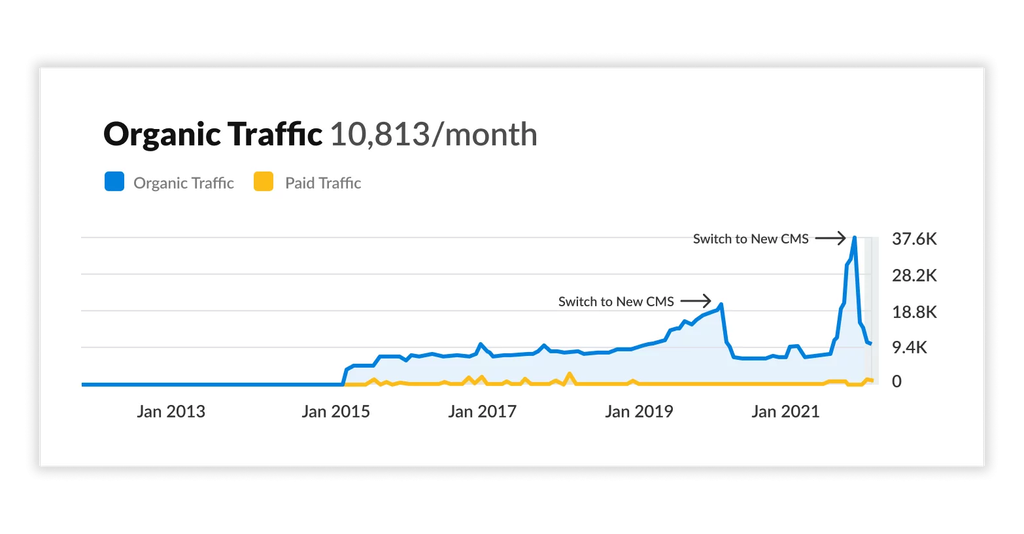
The automotive industry has always been prone to platform churn. Companies switch CMS providers frequently chasing better pricing, responding to management changes, or looking for a fresh start. That instability makes having a consistent SEO process even more important. Without one, every migration becomes a gamble.
In this case, price sensitivity drove the first CMS switch. A change in management drove the second. Both times, the same thing happened: the previous site’s ranking content didn’t make it to the new platform. Pages that had built up authority over time simply didn’t exist on the new site. The result was a cascade of 404 errors, lost rankings, and lost traffic. Twice.
What made this situation particularly costly was that it was entirely avoidable the second time around. The first migration was a hard lesson. The second was a choice to repeat it. Without a dedicated internal or external resource leading the migration with an SEO-first approach, there was no one to enforce the content audit, redirect mapping, and post-launch monitoring that would have prevented the same outcome from playing out again.
Both drops visible in the traffic chart correspond directly to CMS switches. Both were preventable.
Website Migration Case Study: Merging Two Websites
Acquisitions create a specific kind of migration challenge. When a home service provider acquires a competitor, the instinct is to consolidate quickly: fold the acquired company’s web presence under the acquiring domain, capture the combined traffic, and move on. What actually happens is usually more complicated.
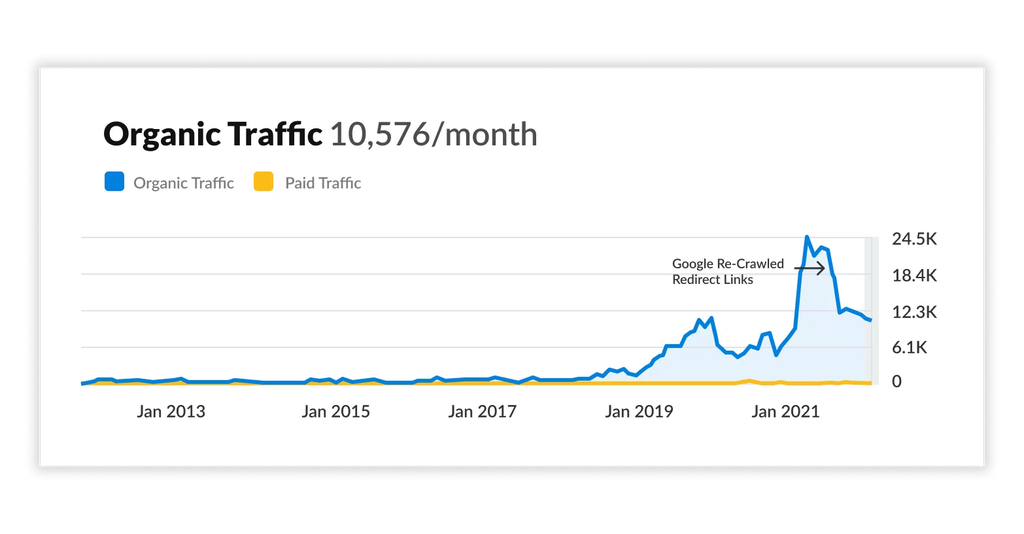
In this case, an agency was already representing both companies, which meant the migration plan was more thorough than most. Redirects were mapped, imagery was addressed, and off-site listings were updated. By most measures, the handoff looked clean. And initially, the traffic numbers reflected that: visits to the acquiring company’s site spiked sharply once the redirects went live.
But the spike didn’t hold. The problem was where the redirects pointed. Most of the acquired site’s pages were redirected to the acquiring company’s homepage or generic service pages rather than to content that matched the original page’s intent. When Google re-crawled those URLs and evaluated the destinations, the mismatch was penalized. Rankings dropped. Traffic followed.
The lesson here is: a redirect that exists is not the same as a redirect that works. Every page being redirected needs to land on content that serves the same user need it was serving before. The traffic surge that follows a merger migration can mask this problem for weeks, which is exactly what makes it so damaging when the correction hits.
How to Recover Lost Content After a Website Migration
If you’ve already migrated to a new CMS and are seeing traffic loss, there’s still a path forward. While there’s no guarantee that every page will recover its previous rankings, acting quickly and systematically gives you the best chance.
What to expect on the timeline: By week eight post-launch, a migration that was reasonably well-executed is typically back to around 90–95% of pre-launch traffic, and over the following weeks it recovers fully or improves as Google rewards the cleaner technical setup.
If you’re still seeing significant drops past that window, it’s a signal that something structural needs to be addressed.
Steps to recover lost content:
- Consult with a digital marketing expert or an SEO management agency with CMS migration expertise..
- Audit Google Analytics to identify which top-performing pages lost traffic or rankings.
- Use Wayback Machine (a tool that archives historical screenshots of websites and pages over time) to view the original content of any lost pages.
- Re-create the content on your current CMS, making sure the URL string matches what was previously ranking.
- Manually request indexing of these URLs through Google Search Console.
- Audit schema markup on recovered pages to ensure structured data migrated correctly. Check using Google’s Rich Results Test, and re-implement any missing markup.
Post-recovery monitoring: After an initial stabilization period of 30 to 60 days, conduct a full post-launch SEO audit to monitor rankings, indexing, traffic, mobile usability, page speed, duplicate content, and any lost metadata. Also check whether your key topics are still appearing in AI Overview results. AI citation recovery is a separate signal from traditional ranking recovery and requires its own verification.
Work With an Agency That Treats SEO as Migration Infrastructure
Your website is the core of your digital marketing presence. And the traffic you’ve built through organic search is not automatically preserved when you move to a new platform. It has to be engineered to survive the transition.
With more than fifteen years of SEO experience, Silverback Strategies helps businesses plan, execute, and recover from website migrations. We approach every migration with SEO embedded from the start — not reviewed at the end — including redirect mapping, schema preservation, AI search visibility, and post-launch monitoring.
Frequently Asked Questions
How long does it take to recover from a bad website migration?

Recovery timelines vary significantly. A study of 892 domain migrations found the average recovery time was 523 days, and 17% of sites never regained their prior traffic levels, even after 1,000 days. The fastest recoveries in that dataset happened in 19–33 days, all of which shared clean redirect maps, minimal content changes at migration time, and rapid post-launch monitoring. The biggest predictor of recovery speed is how quickly issues are identified and fixed after launch.
What's the most common reason website migrations fail?
Incomplete or improperly mapped redirects. This includes redirecting multiple old URLs to the homepage, building redirect chains instead of direct 1:1 URL mappings, and using 302 (temporary) redirects instead of 301 (permanent) redirects. 301 redirects act as canonicalization signals that forward link equity to the new URL; 302s do not. Every indexed URL on the old site needs a 301 redirect to its closest equivalent on the new site.
Do I need to block my staging site from Google?
Yes. Always. If search engines crawl and index your staging site, you can end up with duplicate content issues, incorrect pages appearing in search results, and a slower post-launch recovery. Use your robots.txt file to block crawlers from the staging environment, and verify the block is working before development begins. On launch day, removing that block should be the very first action before anything else.
Can a website migration hurt my AI search visibility?
Yes, and this is a risk most teams don't plan for. AI search tools like Google AI Overviews, Perplexity, and ChatGPT rely on structured data to understand and cite content. If your migration doesn't carry schema markup over correctly to the new platform, AI engines may stop surfacing your content in generated answers even if your traditional rankings recover. This damage is often invisible in standard reporting. Preserving schema markup is now a migration-critical task, not a post-launch cleanup item.
What should I do if I've already migrated and lost traffic?
Start with a full content and redirect audit to identify what's missing or broken. Use Google Analytics and Search Console to pinpoint which pages lost rankings, use the Wayback Machine to recover lost page content, rebuild and republish those pages with matching URLs, and submit them for re-indexing through Search Console. Also audit schema markup on affected pages. AI citation loss is a separate recovery track from traditional ranking recovery. The sooner you act, the more recoverable the situation typically is.
Is some traffic loss after a migration inevitable?
Some fluctuation is normal, particularly with domain-name changes. Even well-executed domain migrations typically see a temporary dip. But significant, sustained traffic loss is not inevitable. Well-planned migrations, particularly those involving only CMS or design changes without a domain change, can maintain or improve traffic. The critical variables are redirect mapping completeness, staging hygiene, schema preservation, and how quickly the team responds to post-launch issues.

